This update makes it easier than ever to set up and manage your organization in Hartic. We are now introducing Departments and Offices, which means you can structure your operations in a clearer and more flexible way.
Administration becomes smoother and more intuitive, saving time and making it easier to work within the platform. In addition, we’ve expanded the filtering options so you can get an even better overview and make more precise selections in various parts of the system.
As an added bonus, the update also includes several minor improvements to both functionality and design, all aimed at creating an even better user experience.
Departments
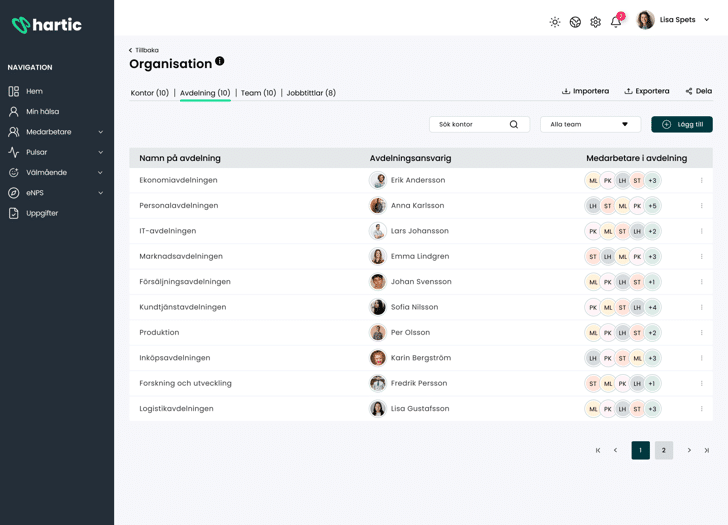
You can now create and manage Departments in Hartic to give your organization a clearer structure. This feature provides you with a better overview and simplifies administration.
Each department has a department head, who automatically serves as the immediate supervisor for the members of that department. This provides a clear division of responsibilities and makes it easier to monitor employees and workflows.
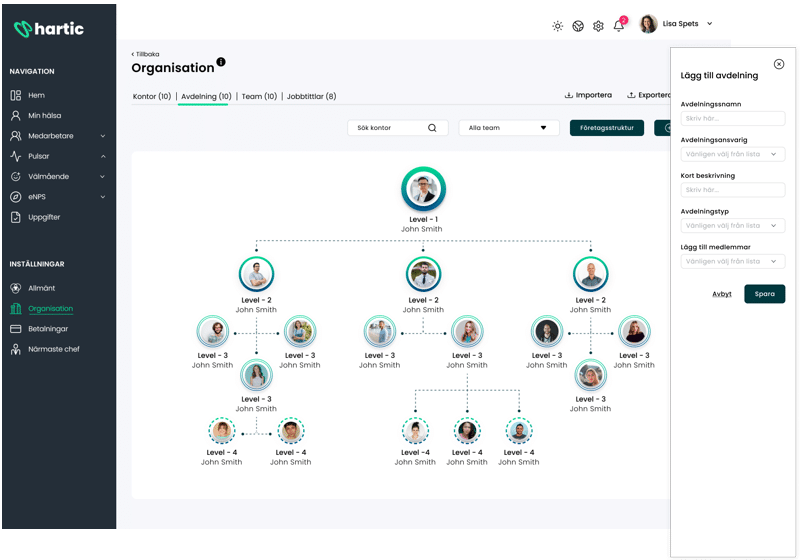
Would you like to create a more detailed organizational structure? In that case, you can assign one department to another, which allows you to build the entire organizational chart directly in Hartic. An employee can only belong to one department, but you can choose which employees to include and easily edit the list within the platform.
We can also let you in on a little secret: we’re working on a major update to the results section. Among other things, this will include clearer views of results with many more options for filtering, sorting, and analyzing data.
Office
With Offices, you’ll have even better options for organizing your operations. Unlike Departments, the fields are not required, which means you can create and customize offices as needed without affecting the overall structure.
From an HR perspective, this is an important update. By linking Teams to specific Offices, you’ll have better options for filtering results and tracking workplace data based on location. Employees are automatically assigned to their offices based on the Teams and Offices they belong to.
Team
Managing teams in Hartic is now easier. With this update, we ensure that every team is always linked to a department, which creates a clearer organizational structure.
A department can have multiple teams, but each team can belong to only one department. However, an employee can still be part of multiple teams, as long as they are within the same department.
All Team administration is handled seamlessly within the same view, making it easy to manage and organize work without having to switch between different sections.
Book a demo and discover the possibilities
This update is part of our ongoing effort to make Hartic even more powerful and user-friendly. Want to see how Departments, Offices, and Teams can improve your organizational management? Book a demo with us, and we’ll show you how to use the new features to create a smoother and more efficient workday!
📣 You'll find the update in your Hartic app within the next few days.